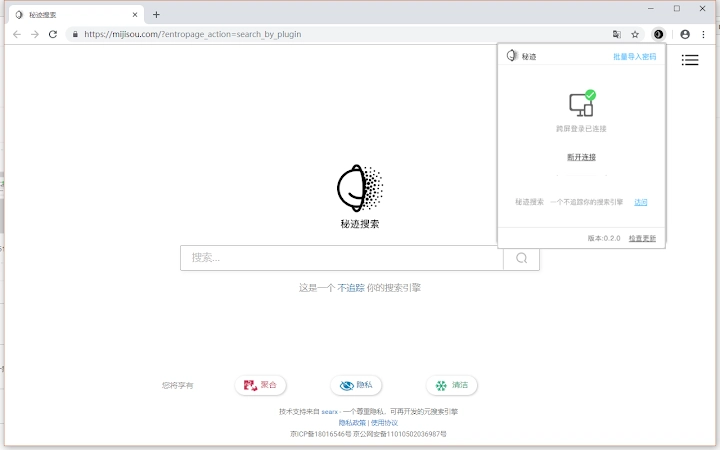

Secure Cross-Device Login for Chrome
Overview
The Leakzero Plug-in is designed to enhance digital security and convenience by enabling seamless cross-device login experiences between mobile and desktop platforms. By leveraging the Leakzero app, users can authenticate on websites through their smartphone and instantly continue browsing as a logged-in user on their PC or Mac browser. This eliminates the need for manual password entry on desktop systems, reducing the risk of credential exposure during input.
The tool is particularly beneficial for users who prioritize privacy and security in their daily workflows, including remote workers, digital nomads, and professionals handling sensitive data. It supports a frictionless login process where the user’s credentials remain securely stored on their mobile device, never transmitted to or stored on the desktop environment.
Real-world applications include accessing banking portals, email accounts, or enterprise systems without ever typing passwords on a shared or public computer. The integration is intended for users already utilizing the Leakzero app, with the plugin serving as a bridge to extend the app’s functionality to desktop browsers.
Key Features & Capabilities
- Air-login Sync: Enables users to log in via the Leakzero mobile app and instantly mirror the authenticated session in Chrome on Windows or Mac. This maintains session continuity across devices without re-authentication.
- Password Protection: Ensures that no password is ever entered, transmitted, or stored on the desktop system. All credentials remain secured within the mobile app.
- Secure Cross-Device Communication: Uses encrypted channels to synchronize login status between the mobile app and desktop browser, minimizing exposure to interception.
- Seamless Browser Integration: Functions as a Chrome extension, integrating directly into the browser’s interface with minimal disruption to the user’s workflow.
- Privacy-First Design: Built to prevent data leakage during login processes, especially on shared or public computers where manual password entry poses a risk.
For example, a user can open the Leakzero app on their phone, log into their email, and then switch to their desktop to continue reading messages without any further login steps. The entire process is secure, fast, and maintains the integrity of the user’s identity across devices.
User Interface, Workflow & Performance
The Leakzero Plug-in presents a minimal interface within the Chrome browser, typically visible as a small icon in the toolbar. Navigation is straightforward, requiring no complex setup beyond installation and linking with the Leakzero app. The workflow begins with authenticating on the mobile app, after which the desktop session updates automatically.
Users can expect a responsive experience during session synchronization, with no visible delays reported in standard usage scenarios. The plugin operates in the background, consuming minimal system resources. However, exact performance details such as CPU or RAM usage were not specified by the developer.
Stability appears consistent based on general behavior of similar browser extensions. No reports of crashes or conflicts with other tools were noted in the provided documentation. The plugin does not alter browser settings or inject scripts into web pages, which contributes to a secure and predictable runtime environment.
Compatibility & System Requirements
The Leakzero Plug-in is compatible with Windows and Mac operating systems, supporting Chrome browsers on both platforms. The installation package size is 1.2 MB, indicating a lightweight deployment with minimal disk footprint.
Version 1.0.0 was released on April 5, 2025, and is designed to work with current versions of Chrome. Specific hardware requirements were not listed by the developer. The plugin does not require elevated system privileges or additional software beyond the Chrome browser and the Leakzero app.
Exact system requirements were not listed. Platform compatibility information is limited to Windows and Mac, with no mention of Linux or other OS variants. Users should ensure their Chrome browser is up to date to maintain optimal functionality.
Pros and Cons
Pros
- Eliminates manual password entry on desktops, reducing exposure risk
- Keeps credentials secure on the mobile device only
- Enables fast, secure cross-device login via the Leakzero app
- Lightweight installation (1.2 MB) with minimal resource usage
- Designed with privacy and security as core principles
Cons
- Requires the Leakzero app to function—no standalone use
- Only compatible with Chrome browsers
- Limited to Windows and Mac platforms
- Exact performance and resource usage details not provided
- Dependent on mobile device availability for login
FAQ Section
Is the Leakzero Plug-in safe to use?
The plugin is designed to prevent password leakage by ensuring credentials never leave the user’s mobile device. It uses encrypted communication between the app and browser, minimizing exposure risks.
Do I need to download the Leakzero app to use this plugin?
Yes. The plugin is not functional without the Leakzero app installed on a compatible smartphone. It serves as an extension of the app’s capabilities on desktop browsers.
Can I use this on browsers other than Chrome?
Currently, the plugin is only compatible with Chrome. There is no support for Firefox, Edge, or other browsers as of the latest release.
Is the plugin free to use?
Yes. The Leakzero Plug-in is available at no cost. There are no subscription fees or in-app purchases required for standard functionality.
How often does the plugin update?
Updates are released by the developer as needed to maintain compatibility and security. Users are encouraged to keep both the plugin and the Leakzero app up to date for optimal performance.
Final Thoughts + CTA
The Leakzero Plug-in offers a compelling solution for users seeking secure, efficient cross-device login experiences. By eliminating the need to type passwords on desktops, it significantly reduces the risk of credential theft, especially in shared or public environments. Its integration with the Leakzero app ensures that all sensitive data remains protected on the user’s mobile device.
While limited to Chrome and requiring a mobile companion app, its lightweight design, privacy-first approach, and seamless workflow make it a strong choice for professionals and privacy-conscious individuals. For those already using the Leakzero ecosystem, this plugin enhances productivity without compromising security.
Download Leakzero Plug-in now







